
Use Community safely and purposefully
Find people and conversations, use channels and forums, manage private messages, and protect your identity and account.
Community is the place to find people, follow public discussions, talk in channels, and keep private conversations separate from your trading account. This guide explains what each destination is for, how visibility and moderation work, and how to participate without exposing financial or security information.
Community in one picture
The six main destinations answer different questions. Choose the destination that matches your task instead of treating Community as one continuous feed.
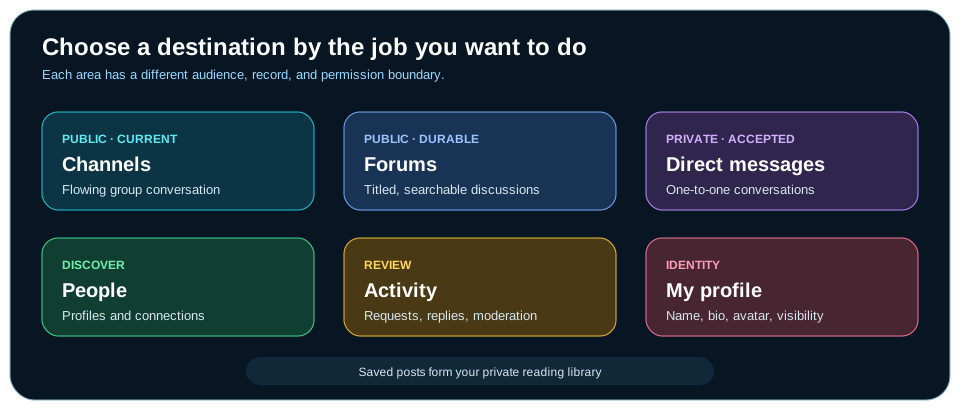
| Destination | Use it when you want to | Important boundary |
|---|---|---|
| Channels | Have a flowing conversation in a public room or an invited private group. | Public channels remain available; private channels require membership. |
| Forums | Publish or find a durable, titled discussion that can be searched later. | New and edited public text is reviewed before broad visibility. |
| Direct messages | Talk one-to-one after connection and message-request acceptance. | Private does not mean suitable for secrets or financial credentials. |
| People | Find a member, connect, or apply mute and block controls. | Profile visibility determines whether broad search can find someone. |
| Activity | Review invitations, mentions, replies, follows, and moderation updates. | Ordinary public-channel traffic does not have to become a notification. |
| My profile | Manage the name, biography, avatar, and visibility others see. | Your Community identity is separate from private account and portfolio data. |
Your first Community visit
- Open Community
The default destination is Channels. Use the Community navigation to move among Channels, Direct messages, People, Activity, Forums, and My profile.
- Create a public-safe identity
Choose a handle, display name, short biography, and visibility. Do not reuse an email address, exchange username, or information that identifies a private financial account.
- Read before posting
Open a channel or browse Forums to understand the tone, topic, and level of context other readers expect.
- Choose the right conversation type
Use Channels for timely discussion, Forums for durable topics, and Direct messages only for accepted one-to-one conversations.
- Keep claims traceable
Use typed references when a member, channel, asset, strategy, or prior post provides useful context. State what you observed and what remains uncertain.
- Use safety controls early
Mute distracting accounts, block unwanted interaction, and report content that may violate policy. You do not need to debate suspicious or abusive material.
Find people and conversations
Community discovery is task-based. People search finds profiles; Forum search finds titled public discussions; channel search narrows rooms; conversation search stays inside the selected private exchange. Search results do not reveal private account, portfolio, billing, or controlled profile information.
| If you know… | Start here | Search for |
|---|---|---|
| A display name, handle, or interest | People | A name, username, or phrase from the biography. |
| A topic, asset, strategy, creator, or phrase | Forums | Words likely to appear in a title or post body. |
| The room where a discussion occurred | Channels | The channel name, then use that channel’s message search. |
| The person in a private conversation | Direct messages | The connection, then search only the messages shared by both participants. |
| A notification or invitation | Activity | Filter by Invitations, Mentions, Replies, Follows, or Moderation. |
Use Channels for live group conversation
Channels organize messages into named rooms. The channel rail separates public rooms from private groups, shows unread or mention state, and can show how many members are currently present. Search, ordering, and mention-only filters help narrow a busy list.
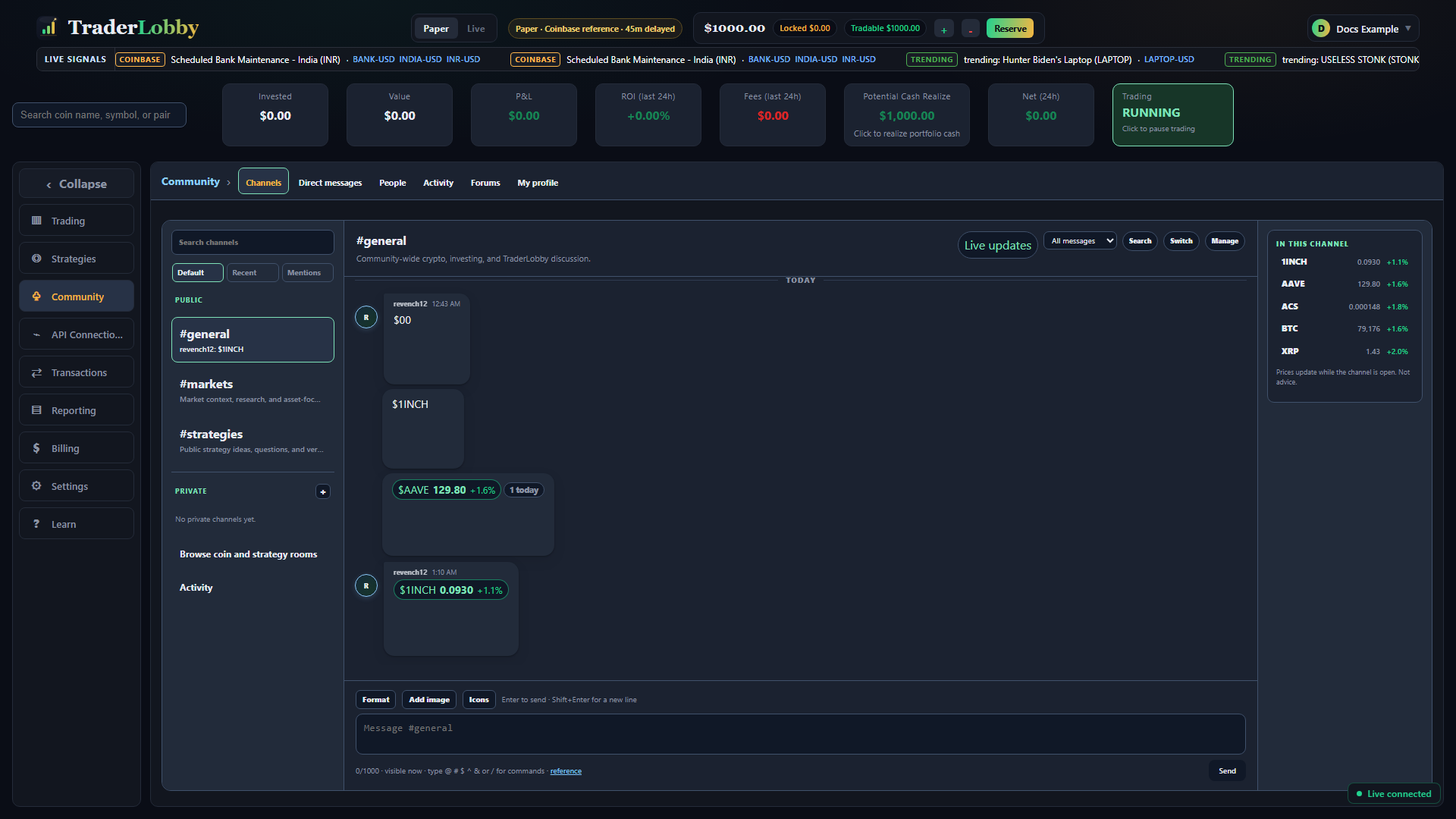
Public and private channels
| Capability | Public channel | Private channel |
|---|---|---|
| Who can enter | Available to eligible Community members. | Only accepted members. |
| Leaving | Public Community channels cannot be left. | A member can leave and needs a new invitation to return. |
| Creating | Provided as shared Community destinations. | Create a named group and invite accepted Community connections. |
| Managing | Community-wide rules apply. | Owners can invite or remove members, choose supported retention, and delete the channel with a reason. |
| Retention | Uses the policy displayed for that destination. | The owner can choose 30 days, 90 days, 1 year, or 2 years. A shorter period affects existing unexpired messages; a longer period applies to new messages. |
Send a useful channel message
- Confirm the room
Read the channel name and description before typing. A message in the wrong public room can reach a different audience than intended.
- Read the recent context
Look for replies, referenced posts, and the unread marker. Load older messages when the visible exchange starts in the middle of a topic.
- Write for the room
Keep one clear point per message. Use Reply when the response belongs to a specific message.
- Add only useful context
Reference a member, channel, asset, strategy, or post when it helps readers verify what you mean. Add an image only when the image itself is necessary.
- Review and send once
Check the room, wording, reference, and attachment before selecting Send. Your own pending item can remain privately visible while review completes.
- Manage attention
Set the channel notification level, mark a useful boundary as unread, or use mention-only filtering so you can return without following every message.
Use Forums for durable discussions
A Forum post has a title and body, can collect comments and replies, and is designed to be found again. The filters answer different questions: For you offers a relevant starting point, Following narrows to followed authors, My posts includes your own moderation-pending history, New emphasizes recency, and Top emphasizes ranked discussion.
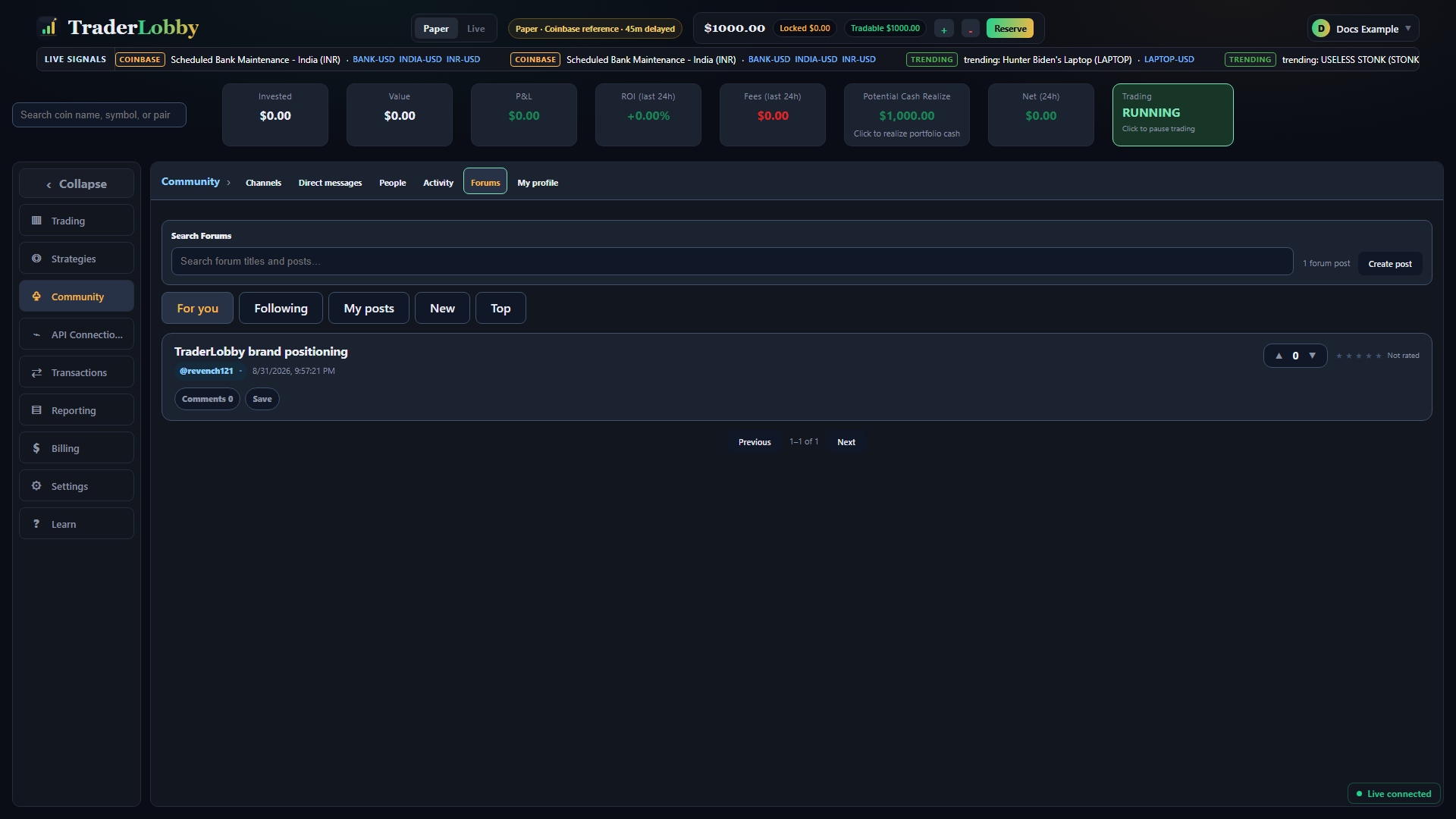
Create a clear public post
- Search before creating
Try the asset, strategy, creator, or central phrase first. Adding to an existing discussion can preserve context and reduce repetition.
- Write a specific title
Use 3–120 characters that describe the question or observation. Avoid promotional promises, unexplained performance claims, or urgency.
- Explain the observation
The body can contain up to 10,000 characters. Separate what you saw, the period or workspace, what you tried, and the question you still have.
- Attach context, not credentials
Add typed references or a safely cropped image. Never include balances, complete identifiers, API credentials, addresses, recovery material, or payment details.
- Submit for moderation
Your exact draft remains private while automated or human review runs. Pending does not mean rejected; it means broad publication has not completed.
- Return to the thread
Use comments and threaded replies to answer the original discussion. Edit or delete your own content when necessary; an edit can require review again.
Read and respond to a post responsibly
Public feedback tools express different things. A vote helps rank usefulness; a one-to-five rating records whether the post was worth reading; Insightful, Bullish, and Bearish are lightweight reactions; Follow changes whose posts appear in your followed view; Save creates a private bookmark. None of these validates a strategy or predicts a result.
| Control | What it changes | What it does not mean |
|---|---|---|
| Vote up or down | The post’s score and ranking signal. | Independent verification of the claim. |
| Rate 1–5 | Your reading-quality rating and the displayed average. | A rating of expected return or financial safety. |
| React | Your selected response and reaction count. | An order, strategy setting, or recommendation. |
| Comment or Reply | Adds a public response in the discussion. | A private conversation with the author. |
| Follow | Adds the author to your followed reading context. | A subscription to, or enablement of, the author’s strategy. |
| Save | Adds the post to your private Saved library. | A public endorsement or ranking change. |
Connect before using Direct messages
Direct messaging uses two deliberate approvals. First, members become Community connections. Then one person sends a message request that the other accepts. This prevents a searchable profile from automatically becoming an open private inbox.
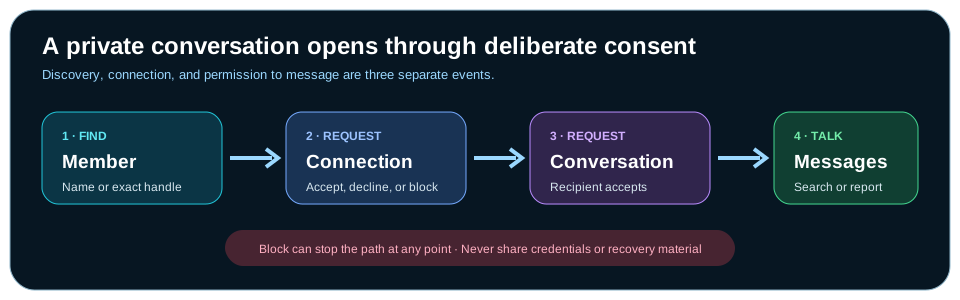
- Find the member
Search by name or username. For a private profile, enter the exact username.
- Send a connection request
The other member can accept, decline, or block it. A pending request does not grant messaging access.
- Send a message request
After connection, request a conversation. The conversation opens only after the recipient accepts.
- Confirm the participant
Read the display name and handle at the top of the conversation before sending information.
- Use private-safe content
Direct messages are encrypted at rest, update live, and display their retention period. They are still not a place for passwords, keys, verification codes, account identifiers, or confidential financial records.
- Search or report when needed
Conversation search is limited to messages shared by the two participants. Report an unsafe message from its action menu, or block the member to prevent further interaction.
Build a profile that protects your account
Your Community profile is a public-safe identity, not your legal account profile. New or edited text stays out of discovery until moderation completes.
| Field | Customer-facing rule | Good practice |
|---|---|---|
| Handle | 3–24 lowercase letters, numbers, or underscores; it must be available and not reserved. | Use a name that is not your email, exchange login, or legal identifier. |
| Display name | 2–40 characters. | Choose a recognizable Community name without implying an official role. |
| Biography | Up to 280 characters; links, embedded media, markup, emoji, and inappropriate language can be rejected. | Describe interests or experience without publishing account or location details. |
| Avatar | Uploaded images can remain under review or be rejected. | Use an image you have the right to share and that contains no private data. |
| Visibility | Public, visible to signed-in members, or private. | Select the smallest audience that fits how you want to participate. |
Use Activity and Saved as personal workspaces
Activity collects invitations, mentions, replies, follows, moderation decisions, and optional reaction notices. Filter the list, open the destination, mark one item read or unread, or select Mark all read. Notification preferences determine which supported events are created before they reach Activity.
Saved is your private reading list. Select Save on a Forum post to keep it; select Saved again to remove it. Saving does not notify the author, change public ranking, subscribe to a strategy, or enable trading.
Add references and images with context
Typed references turn text into a route back to authorized context. Suggestions show only destinations the reader is allowed to discover.
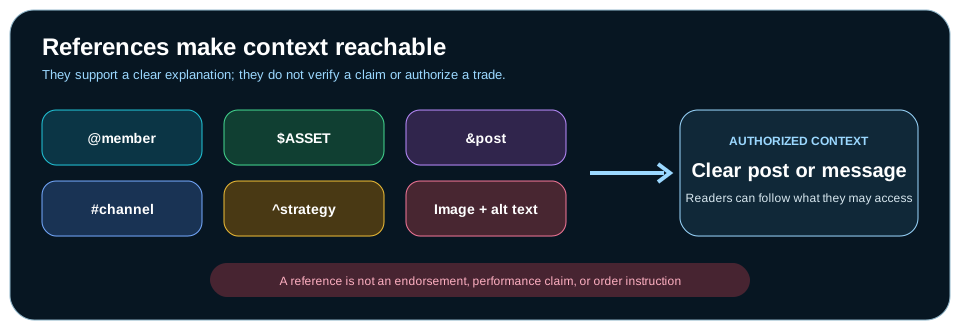
| Type | Pattern | Use it for |
|---|---|---|
| Member | @handle | Name the person whose contribution or attention is relevant. |
| Channel | #channel | Point to a room the reader is authorized to open. |
| Asset | $ASSET | Identify the asset under discussion without implying an order. |
| Strategy | ^strategy-key | Open the customer-visible strategy context when available. |
| Post | &post | Link a prior Forum discussion by searching its title. |
| Image | Upload control | Add a JPEG, PNG, WebP, or GIF with a 3–280 character accessibility description. |
An image can show Validating image… while review runs. Crop it before upload and inspect the background, browser chrome, filenames, notification previews, and every visible field. If the same point can be explained safely in text, text is often the better choice.
Mute, block, report, edit, and remove
| Action | Use it when | Result |
|---|---|---|
| Mute | You do not want to see an account’s content. | The account disappears from your feed, directory, search, typed references, and Activity. |
| Block | You want to prevent interaction. | Includes the mute effect, removes follows in both directions, and prevents interaction. The other member is not notified by the block action. |
| Report | Content may be spam, harassment, misinformation, a financial scam, hate or abuse, or another policy violation. | Sends the selected item and reason for review; reporting is not a public argument. |
| Edit your content | You need to correct or clarify your own post, comment, or eligible message. | The new version can require moderation before it is broadly visible. |
| Delete your content | You no longer want your own contribution available. | Removes the item from its normal destination, subject to applicable retention and safety records. |
| Leave a private channel | You no longer want membership. | Access ends; a new invitation is required to return. |
A practical safety and acceptable-use checklist
- Protect secretsNever share credentials, recovery material, verification codes, or private keys—even in a direct message.
- Protect financial privacyCrop balances, account numbers, transaction identifiers, tax information, addresses, and payment details from images and text.
- Separate observation from predictionName the workspace, period, source, and limitations when discussing a result. Do not present Paper, historical, or community claims as guaranteed Live outcomes.
- Respect ownershipShare only text and images you have permission to publish. Do not expose another member’s private conversation.
- Keep discussion constructiveChallenge an idea with context; do not harass, threaten, impersonate, spam, manipulate, or pressure another person.
- Use product records for product factsCommunity cannot confirm whether an order filled, a balance changed, or a strategy is enabled. Use Trading, Transactions, Reporting, and the exchange record.
- Report suspected scamsDo not send funds, credentials, or personal documents in response to an unsolicited request. Report and block the account.
Community troubleshooting
| What you see | What it usually means | Safe next action |
|---|---|---|
| Your post or profile is visible only to you | The exact text or image is awaiting moderation. | Wait for an Activity update. Avoid repeated submissions; revise only if you find a real error. |
| No matching person appears | The query may not match, or the profile may be private. | Check the spelling. For a private profile, use the exact handle in Direct messages. |
| You cannot send a direct message | The connection or message request has not been accepted, or a safety control changed. | Review Requests and Connections. Do not try to bypass a decline or block. |
| A private channel disappeared | You may have left, been removed, or the owner may have deleted it. | Check Activity. Ask an existing connection for a new invitation only when appropriate. |
| An image remains under review | The image has not completed validation. | Wait for the status to change. If rejected, replace it with safe text or a newly cropped image. |
| Unread counts look stale | The view may not have reconciled the latest activity yet. | Open the destination, then refresh once. Preserve the exact visible message if the issue repeats. |
| You see abusive or suspicious content | The content may violate Community rules. | Report the specific item, then mute or block the account. Do not share the content more widely. |
A five-minute Community routine
- Review Activity
Handle invitations, direct mentions, replies, and moderation decisions first.
- Open the right destination
Use Channels for current conversation, Forums for durable topics, and Messages for accepted private exchanges.
- Read the context
Follow references, dates, authorship, workspace, and limitations before reacting.
- Contribute one clear thing
Ask a focused question, add a supported observation, or give a useful reply.
- Save or follow deliberately
Use Save for a private reading list and Follow for an author’s future discussion context.
- Leave the record safer
Remove private data from drafts and use mute, block, or report when interaction is not constructive.