
Learn and Play with confidence
Use visual lessons, saved progress, transcripts, and Reef Keeper to learn safely before applying a concept.
Learn turns crypto, market, risk, and TraderLobby concepts into short visual chapters you can pause and revisit. Play adds an interactive market aquarium called Reef Keeper. Use both to build understanding—but treat lessons and game results as education, not as a recommendation, forecast, or substitute for verifying a Live action.
Learn and Play at a glance
The five tabs are different learning routes, not difficulty requirements for using the rest of TraderLobby.
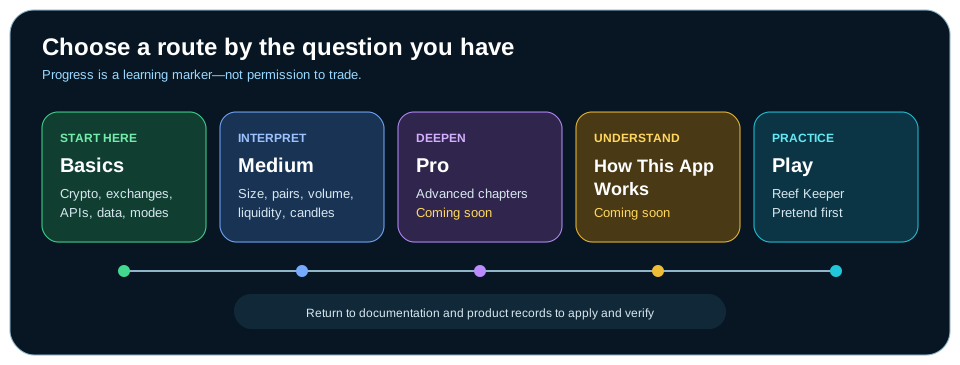
| Route | Best for | Current experience |
|---|---|---|
| Basics | First explanations of crypto, exchanges, APIs, market information, and Paper versus Live. | Six available narrated, animated chapters. |
| Medium | Reading size, pairs, activity, liquidity, and charts with more context. | Four available chapters and three clearly marked Upcoming chapters. |
| Pro | More advanced market and trading literacy. | No available chapters yet; the page shows Chapters coming soon. |
| How This App Works | Customer-facing explanations of TraderLobby behavior. | No available chapters yet; use this documentation for current product guidance. |
| Play | Practicing buy, add, reduce, and sell decisions in Reef Keeper. | Pretend money is the safe default. Real-cash controls are conditional and consequential. |
Orient yourself in the learning library
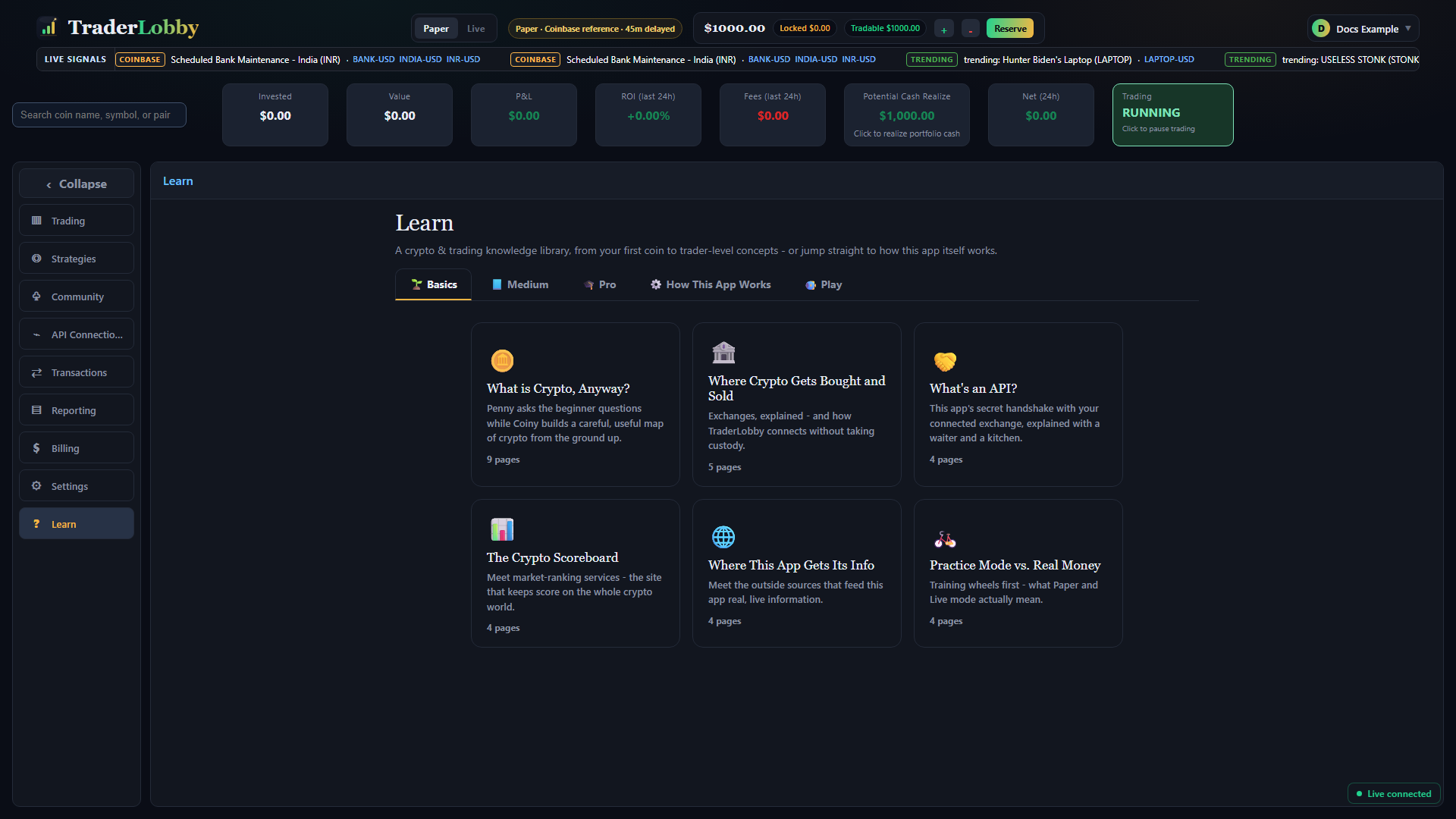
Each chapter card shows an icon, title, summary, and status. Available cards show their page count; started chapters show the page where progress stopped; completed chapters show a checkmark; planned cards show Upcoming and cannot be opened.
- Open Learn
The library opens on Basics. On a phone, Learn uses a full-screen customer view with its own Close control.
- Choose a route
Select Basics, Medium, Pro, How This App Works, or Play. The tab row scrolls horizontally on narrow screens.
- Read the card before opening
Use the title and summary to decide whether the chapter answers your current question.
- Check availability and status
A page count means the chapter is available. Upcoming means it is planned. In progress and Complete reflect saved progress.
- Open one chapter
Select an available card. A Continue banner can take you directly to the unfinished chapter in that route.
- Return with a useful question
After the chapter, revisit the relevant documentation or product area and check whether the concept now helps you interpret a label or decision.
Follow the Basics learning path
Basics is written for a complete beginner. The chapters build a foundation without requiring a finance background and without exposing proprietary strategy logic.
| Chapter | What it helps you understand | Approximate time |
|---|---|---|
| What is Crypto, Anyway? | Digital ownership, blockchains, consensus, wallets, keys, coins, tokens, and a beginner safety checklist. | About 8 minutes |
| Where Crypto Gets Bought and Sold | What an exchange does, how buyers and sellers meet, where funds remain, and how TraderLobby differs from custody. | About 5 minutes |
| What’s an API? | How applications exchange requests and responses, and why permission boundaries matter. | About 3 minutes |
| The Crypto Scoreboard | Market capitalization, rankings, supply, and why a snapshot is not a prediction. | About 3 minutes |
| Where This App Gets Its Info | Outside market sources, the difference between data and decisions, and the limits of mood indicators. | About 8 minutes |
| Practice Mode vs. Real Money | Paper and Live boundaries, what practice can reproduce, and why Live has real consequences. | About 8 minutes |
Use Medium to read market context more carefully
Medium assumes the basic words are familiar and focuses on interpretation. It teaches questions to ask—not signals to copy.
| Chapter | Status | Main question |
|---|---|---|
| How Big Is This Coin, Really? | Available | How do supply, dilution, liquidity, and market capitalization change what “big” means? |
| What Does “BTC-USD” Even Mean? | Available | Which asset is being bought, which asset prices it, and how should the pair be read? |
| The Crowd Noise of the Market | Available | How are trading volume and ease of entry or exit related without being identical? |
| Reading a Candle Chart Without Falling Asleep | Available | What do open, high, low, close, bodies, wicks, and timeframes show? |
| Your Safety Nets | Upcoming | How do planned loss and profit exits differ from guaranteed execution? |
| Don’t Bet the Rent Money | Upcoming | How do account size, position size, diversification, and essential money differ? |
| Fees & Spreads: The Toll Booths of Trading | Upcoming | How can fees and spread change the result of a complete round trip? |
Understand Pro and How This App Works
Pro is reserved for deeper market and trading literacy. How This App Works is reserved for customer-facing explanations of TraderLobby itself. Neither currently has available chapters, so selecting either shows Chapters coming soon.
Until those routes fill out, use the documentation for current, task-specific product instructions: connect an exchange, choose a strategy, read Trading, reconcile Transactions and Reporting, or use Community.
Read the lesson player from top to bottom
The player combines an animated teaching scene with narration and a full text transcript. The scene provides visual context; the transcript carries the complete explanation and remains usable when sound is off.
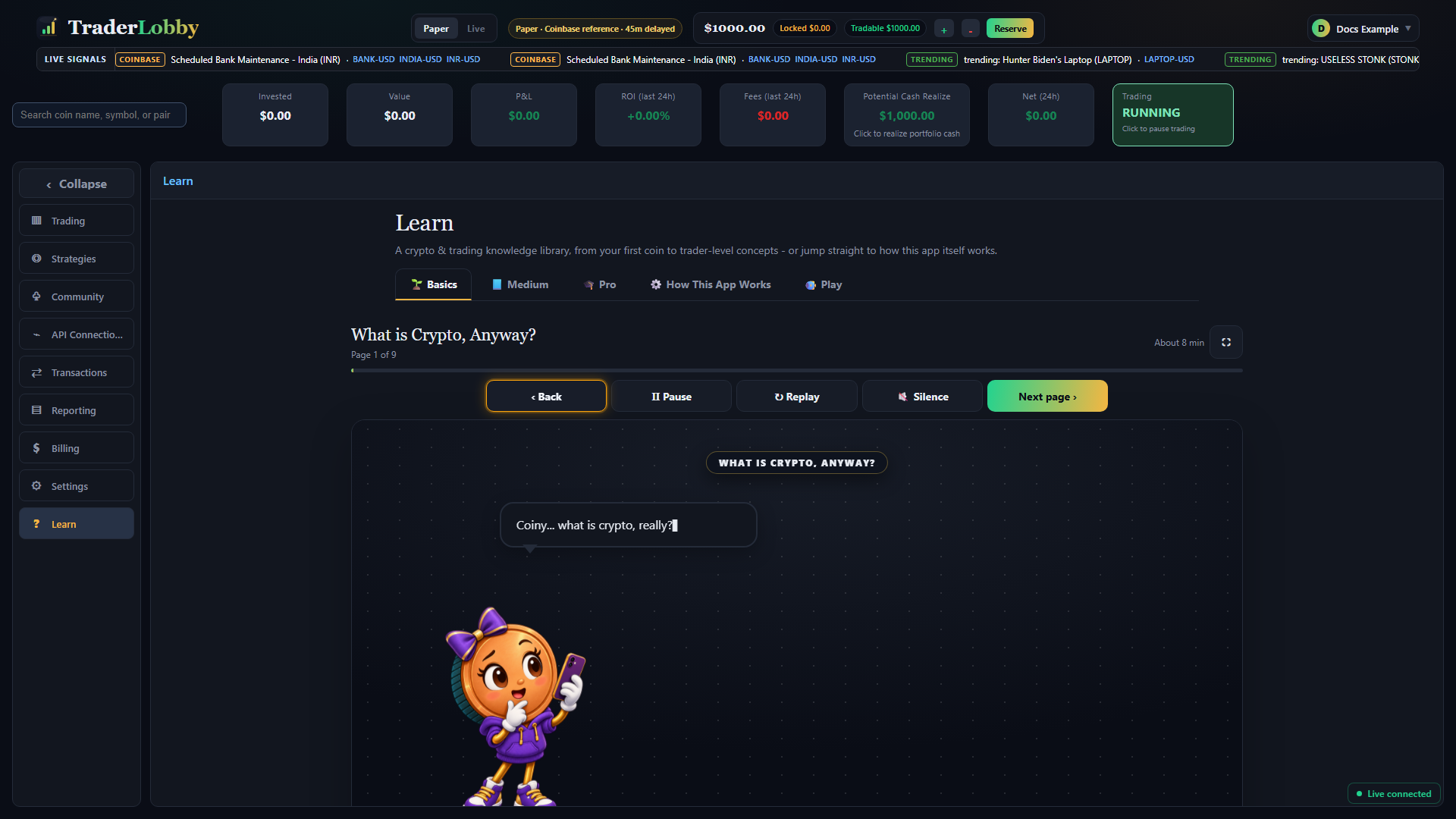
| Control | What it does | What to expect |
|---|---|---|
| Back | Moves to the previous page; on page 1 it exits to the chapter list. | Your most recently viewed page remains the resume point. |
| Pause / Continue / Play | Stops or resumes the timed scene and narration. Play restarts after the page has ended. | It does not change the chapter’s written content. |
| Replay | Restarts the current page’s scene and narration from the beginning. | The chapter remains on the same page. |
| Silence / Sound | Turns narration off or on and remembers that preference. | The full transcript remains available when silent. |
| Next page / Finish | Moves forward; Finish records completion on the final page and exits. | Advancing manually does not require waiting for the animation to end. |
| Fullscreen | Expands the lesson player and limits outside page scrolling. | Exit with the visible control or the supported device/browser fullscreen action. |
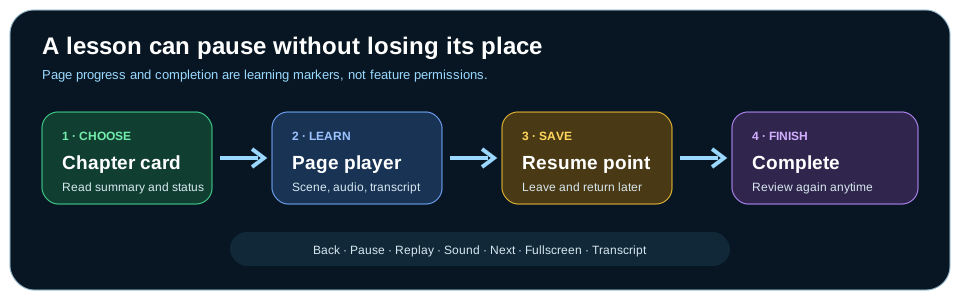
Understand progress and resume behavior
- Open a chapter
The library records that the chapter was started.
- Move through pages
The current page becomes the saved resume point. The progress bar combines page position with the current scene’s elapsed time.
- Leave when needed
Use Back on the first page or leave Learn. You do not need to finish in one session.
- Return to the same route
An unfinished route can show Continue with the chapter title. The chapter card also shows In progress and the saved page.
- Finish deliberately
On the final page, select Finish. The card changes to Complete after completion is recorded.
- Reopen whenever useful
Complete does not lock the chapter. Open it again to review the content; completion is a learning marker, not a product permission.
Signed-in progress is synchronized when possible. The device also keeps a recent progress copy, so a temporary save problem does not have to interrupt learning. If two copies differ, the completed or furthest useful progress is favored.
Learn with or without sound
- Use the full transcriptIt contains the narration in text, can receive keyboard focus, and scrolls inside its own region when long.
- Silence narrationChoose Silence when audio is distracting or unavailable. The visual scene and transcript still carry the lesson.
- Replay one pageReplay is useful when the visual sequence moved faster than expected.
- Use fullscreen selectivelyFullscreen reduces surrounding distractions. On small screens, exit before changing another app area.
- Expect a browser gesture sometimesIf automatic narration is blocked, the player can ask you to tap before sound begins.
Play overview: Reef Keeper
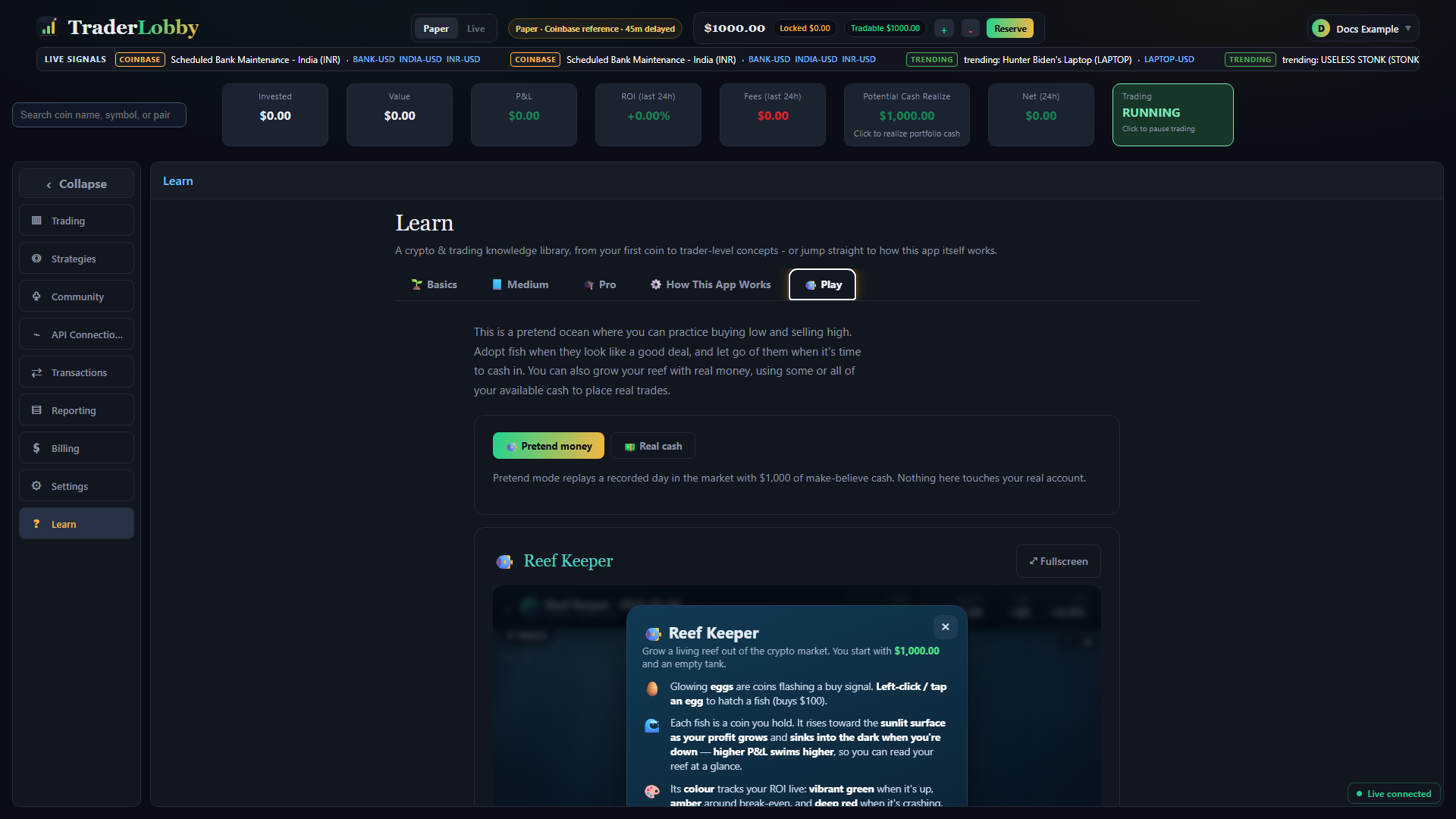
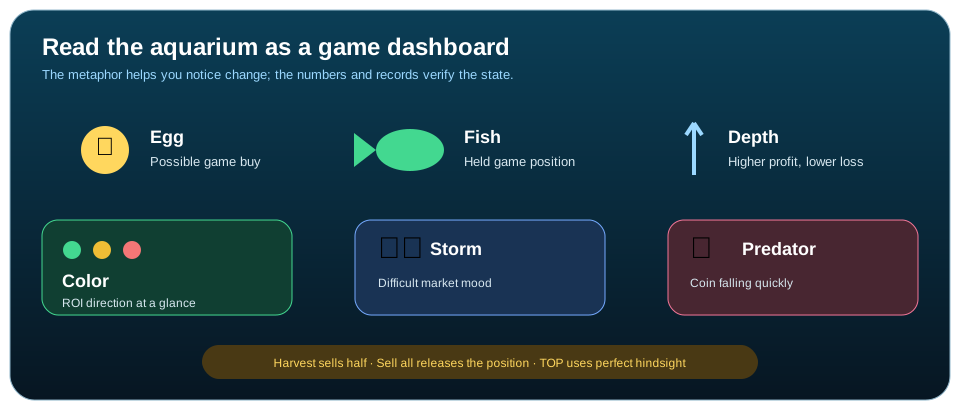
Reef Keeper turns a market sequence into an aquarium. In Pretend money, glowing eggs represent possible buys, fish represent holdings, and the reef’s movement visualizes changing profit and loss. It is a practice game—not a strategy backtest, a forecast, or evidence that the same decisions will work again.
| Game element | Meaning in Reef Keeper | Customer action |
|---|---|---|
| Glowing egg | A coin currently presented as a game buy opportunity. | Tap or click to hatch a fish and make the game buy. |
| Fish | A coin position held in the game session. | Select it to review Buy, Max, Harvest, or Sell all. |
| Depth | Higher fish indicate stronger profit; sinking fish indicate loss. | Use it as a quick visual, then read the displayed values. |
| Color | Green, amber, and red show positive, near-break-even, and falling ROI context. | Do not rely on color alone; confirm the number and action. |
| Storm and predator | The game represents difficult market mood and a coin falling quickly. | Decide whether to reduce or release the fish; urgency is part of the game. |
| TOP | The best theoretical ROI the replay could achieve with perfect knowledge of that recorded day. | Use it as a game benchmark, never as a realistic forecast or repeatable return. |
Play a Pretend money session
Pretend mode replays a recorded market day with $1,000 of make-believe cash. A standard hatch uses a fixed game amount, and the day advances quickly so you can practice repeated choices.
- Confirm Pretend money
The Pretend money button should be selected. Its caption must say that nothing touches your real account.
- Read How to play
Learn the egg, fish, depth, color, storm, predator, and score metaphors before starting the clock.
- Watch first if useful
Watch demonstrates a perfect-information route through the recorded day. Touching the reef returns control to you.
- Hatch and observe
Select a glowing egg to buy. Watch how the fish’s depth, color, displayed value, and the broader reef change.
- Choose how much to change
Buy adds the standard amount; Max uses the game’s remaining cash; Harvest sells half; Sell all or a supported hold gesture closes the entire fish position.
- Read the result
At the end, remaining fish are settled and the game compares your profit and ROI with TOP for that recorded day. Retry to practice a different decision path.
Treat Real cash as a separate, conditional Live action
The real-cash option is not available in every deployment or account. When available, it requires an explicit session allocation, a loss cap, and a second confirmation. It uses current prices and follows the active application workspace: Paper activity remains simulated; Live activity can submit real orders.
| Boundary | What it controls | What it does not do |
|---|---|---|
| Session allocation | Limits how much session cash can be committed to buys at one time. | It is not a profit target and does not prevent market loss on an open position. |
| Loss cap | Locks new buys after the session’s measured loss reaches the selected limit. | It does not automatically sell existing positions or guarantee the final loss will equal the cap. |
| Confirmation | Records that you understand the session may use real money. | It does not override connection permissions, available cash, provider rules, minimums, fees, spread, or rejection. |
| Sell controls | Request a partial or complete sale of an eligible game-attributed position. | A visual animation is not final proof of exchange execution. |
Before a real-cash session, review the connected exchange, tradable cash, trading budget, order permissions, and Trading state. After every consequential action, verify the order and fill in Transactions and at the exchange. Pause when an outcome is unclear.
Use Reef Keeper controls deliberately
| Control or gesture | Effect | Verification |
|---|---|---|
| Tap an egg | Buys the standard amount and creates a fish when successful. | Confirm the fish and updated cash; in Live, confirm the provider record. |
| Buy | Adds the standard amount to the selected fish. | Read the updated position and remaining session allocation. |
| Max | Uses the game’s currently available session cash. | Review the amount before acting; never treat Max as a recommendation. |
| Harvest ½ | Sells half of the selected position. | Confirm remaining quantity and the realized result. |
| Sell all / hold | Closes the selected game position when execution succeeds. | Confirm zero remaining quantity and the final record. |
| Pause menu | Freezes the game clock and offers resume, restart, instructions, or stop. | Pausing the game is not the same as pausing TraderLobby Live automation. |
| Fullscreen | Expands the game. Mobile play is designed for an upright phone. | Rotate upright if prompted; exit fullscreen before navigating elsewhere. |
Troubleshoot lessons, audio, progress, and Play
| What you see | Likely explanation | Safe next action |
|---|---|---|
| Narration does not start | The browser may require a gesture, Sound may be off, or audio may be unavailable. | Select Sound, tap once if prompted, and use the full transcript if audio remains unavailable. |
| The scene stopped moving | The page is paused or the scene reached its end. | Select Continue, Play, or Replay. You can also move to Next page without waiting. |
| Progress did not appear to save | The latest synchronization may not have completed. | Return to the same route and check the card. Continue learning; contact support if the resume point repeatedly moves backward. |
| A chapter cannot be opened | It may be marked Upcoming, or the route may have no chapters yet. | Choose an available chapter or use the related documentation page. |
| Reef Keeper does not fit the phone | The game is designed for portrait orientation in fullscreen. | Rotate the phone upright or exit fullscreen and use the embedded view. |
| A pretend action does not change the real portfolio | Pretend money is intentionally isolated from the account. | No repair is needed. Use Pretend money for practice. |
| A real-cash session cannot start | The feature, account, connection, workspace, cash, or required storage may not support it. | Do not work around the message. Return to Pretend money and use the visible error when contacting support. |
| A Live game action is unclear | The visual state may be ahead of or behind the provider result. | Stop repeating actions. Check Transactions and the exchange, then pause Live trading if the result remains uncertain. |
A safe learning routine
- Name the question
Choose one concept you want to understand instead of opening chapters at random.
- Select the closest route
Use Basics for foundations, Medium for interpretation, documentation for current product tasks, or Pretend money for practice.
- Use the player actively
Pause, replay, silence, read the transcript, and move between pages at your pace.
- Write down the boundary
Record what the lesson explains and what it does not prove—especially around rankings, charts, Paper, and performance.
- Practice without consequences
Use Paper or Reef Keeper’s Pretend money before considering a Live action.
- Verify in the right record
Use Learn to understand; use the product and exchange records to determine what actually happened.