Understand the words used across modes, strategies, capital, orders, positions, evidence, reports, and customer controls.
Trading software becomes harder to use when several familiar words mean slightly different things. This reference gives TraderLobby terms one stable, plain-language meaning so you can read a card, warning, report, or confirmation without guessing.
Page type: Reference · For: Every TraderLobby customer · Reading time: 15–18 minutes · Previous: App tour
The vocabulary follows the life of an activity
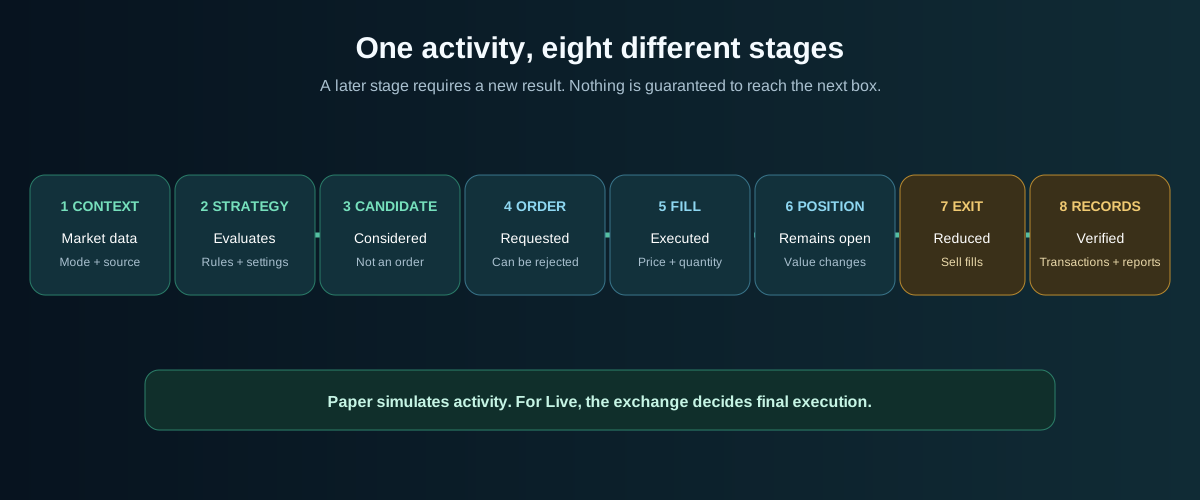
Many terms describe a stage, not the same object with a different name. A strategy can consider a candidate without creating an order. An order can be rejected without creating a fill. A fill can open or reduce a position. Reports summarize records after those events.
Each arrow means “may lead to,” not “will always become.” Paper simulates order and fill stages; for eligible Live activity, the exchange makes the final execution decision.
Stage
Question it answers
Where you see it
Market context
What prices and conditions are available to this workspace?
Live Signals, Paper reference notice, coin universe, and provider-backed Live views.
Strategy
Which defined process is evaluating opportunities?
Strategies and Trading strategy cards.
Candidate
Which asset is under consideration?
Strategy Eligible Candidates.
Order
Was a request to buy or sell created?
Transactions and supported manual-action confirmations.
Fill or execution
Did any quantity execute, and at what price?
Recent fills, Transactions, and the provider.
Position
What app-attributed holding remains open?
Portfolio positions in Trading.
Exit
Was a position reduced or closed by a sell?
Exit information, Transactions, and the provider.
Report
How did recorded activity add up during a period?
Reporting.
Modes and evidence environments
Paper, Live, and Lab describe different environments. Do not combine them into one performance claim without identifying the source, period, and limitations.
Term
Definition
Do not confuse it with
Paper
Your simulated workspace, using simulated cash, positions, fills, and the disclosed delayed market reference. It sends no exchange order.
A preview of exactly what Live would have earned.
Live
Your real-account workspace. When every account, provider, permission, budget, strategy, and safety gate passes, it can send real order requests.
A promise that the exchange will accept or fill an order.
Lab
A controlled recorded-history evaluation used for eligible strategy evidence under its stated methodology and version.
Your Paper account, a customer Live result, or a forecast.
Backtest or historical result
A calculation using past recorded conditions and stated assumptions.
Evidence that future market conditions will repeat.
Aggregated Live evidence
Eligible completed real-money outcomes combined under the displayed evidence rules when enough qualifying data exists.
Your personal result or every customer’s activity.
Workspace
The Paper or Live context currently selected in the application.
The menu page you opened. Changing pages does not change mode.
A defined process that evaluates supported market context under visible customer settings and private decision logic.
It is not an asset, order, subscription, or promise of profit.
TraderLobby Original
A strategy published by TraderLobby with customer-visible purpose, evidence, version, and controls.
It remains uncertain and subject to the same performance disclosures.
Community strategy
An eligible creator-published strategy with visible source, access, evidence, and moderation state.
Community origin does not turn a statement into verified advice.
Decision engine
Control that allows or prevents a strategy from opening new positions in the selected mode.
Disabling it does not automatically sell existing positions.
Candidate
An asset considered by a strategy after some checks.
It is not an order, fill, or holding and can wait or disappear.
Coin universe
Supported markets available for consideration in the displayed context.
Visibility does not mean every strategy evaluates or will buy the asset.
Position slot
One unit of allowed concurrent holdings for a strategy.
It limits count; it does not reserve a coin or guarantee use.
Used slot
A slot attributed or reserved for an open or in-progress state.
A tiny holding hidden by a dust filter can still affect state.
Capital allocation
Customer-visible method used to choose a target amount for a new entry.
Cash, strategy cap, budget, minimums, and provider rules still apply.
Strategy default
The strategy’s supported default entry target.
It is still bounded and is not permission to spend the full balance.
Fixed amount per entry
A preferred dollar target for each eligible entry.
Actual amount can be lower or zero when another limit applies.
% of PCR per entry
A target calculated from Potential Cash Realize.
It is not a percentage of cash alone and cannot bypass caps.
Preferred minimum entry
The smallest ordinary entry you want, subject to the provider minimum.
It cannot force an order when requirements fail.
Use remaining eligible cash
Allows an eligible remainder below the ordinary target when the provider minimum is still met.
It does not bypass the provider minimum or create cash.
Orders, fills, and positions
These words form a sequence. Treating them as synonyms is one of the easiest ways to misunderstand account activity.
Term
Definition
Example or consequence
Buy
Order side that requests acquiring a base asset with the quote currency.
A BTC-USD buy requests BTC and spends USD if filled.
Sell
Order side that requests disposing of a base asset for the quote currency.
A BTC-USD sell requests selling BTC for USD.
Market order
Request to trade promptly at available market prices.
The estimate can differ from final fills due to movement, spread, liquidity, and fees.
Order
Request with a side, market, size, type, and provider context.
Submitted does not mean filled; it may be pending, rejected, canceled, partial, or filled.
Order permission
Provider authorization for supported trading requests.
A credential can read balances while order permission still fails.
Fill or execution
Quantity and price reported as executed against an order.
One order can have no fill, one fill, or multiple partial fills.
Partial fill
Only part of the requested quantity executed.
The remainder follows provider behavior and may stay open or resolve later.
Position
An app-attributed open holding with quantity and recorded basis.
A buy can open or add; a sell can reduce or close.
Quantity
Number of base-asset units represented.
It is not the same as dollar value.
Notional or gross
Dollar value associated with requested or executed quantity before applicable adjustments.
Final cash movement can differ after fees or multiple fills.
Average or basis
Recorded cost reference for understanding an open position.
It is not necessarily the current market price.
Manual sale
Customer-confirmed supported sell initiated from the portfolio.
It is different from disabling or removing a strategy.
Realize portfolio cash
Workflow requesting supported positions be sold toward cash.
Proceeds remain estimates until execution completes.
Cash, capital, and portfolio terms
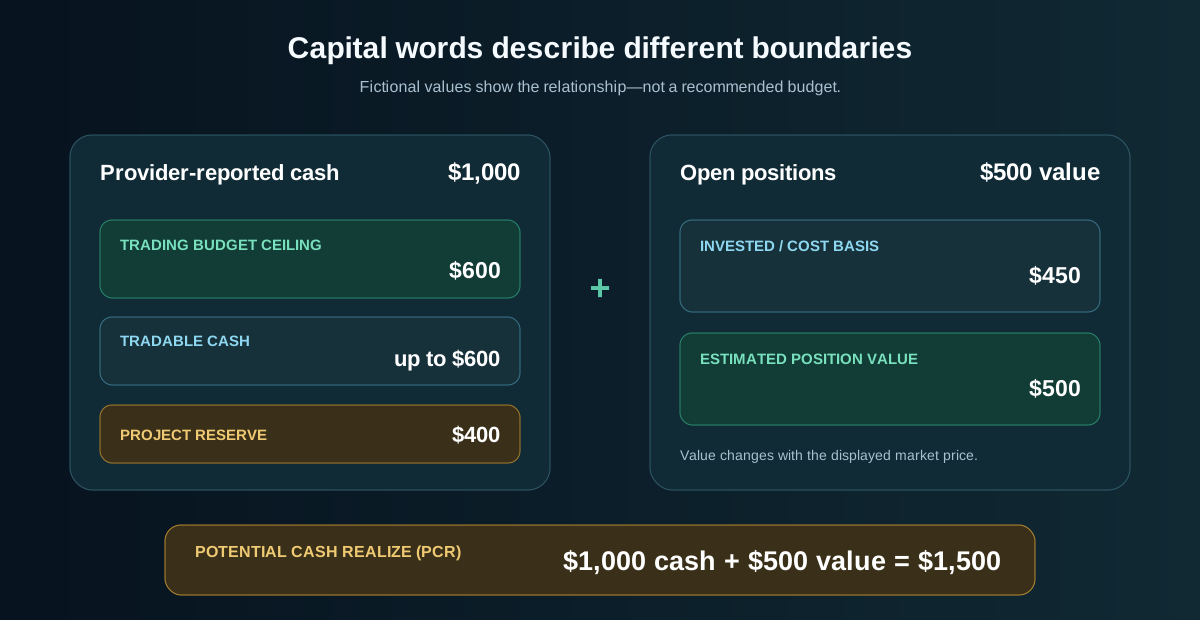
These terms describe different boundaries around the same account. The diagram is a fictional teaching example, not customer data or a recommended allocation.
Real eligibility also depends on provider, market, strategy, position, and safety rules.
Term
Plain-language definition
API-reported cash
Cash or quote-currency amount returned by the connected provider for the selected account.
Maximum cash TraderLobby may use
Your trading-budget ceiling for that connection. Zero is the safest starting state. It is not a transfer or instruction to invest all of it.
Trading budget
The same customer-defined ceiling viewed as a budget for supported new app-directed entries.
Project reserve
Provider-reported cash outside the current TraderLobby trading budget or otherwise reserved by displayed controls.
Profit reserve or profit skim
Optional control placing an eligible share of realized profit into reserve under the displayed setting.
Tradable cash
Cash currently eligible for supported entries after relevant provider balance and customer controls.
Invested
Recorded cost basis or deployed amount associated with app-attributed open positions in the selected view.
Position value
Current estimated value of an open position using the applicable displayed price.
Portfolio value
Combined estimated value of positions represented by the portfolio view.
Potential Cash Realize (PCR)
Estimated account equity represented by available cash plus current estimated open-position value. It approximates what the represented account could become in cash before final execution, fees, spread, and price movement.
PCR percentage
Strategy entry target calculated as a percentage of Potential Cash Realize. Available cash and all other limits still cap the entry.
Trading or quote currency
Currency used to price and settle a supported market, such as USD, USDC, or USDT depending on provider. No hidden conversion is implied.
Dust
A very small holding. Hiding it changes presentation only, not ownership, totals, or position state.
Performance and reporting terms
Term
How to read it
Limitation
P&L
Profit and loss under the stated basis, positions, realized activity, period, and fee treatment.
Identify whether it is open, realized, combined, today, 24-hour, or period-based.
Unrealized or open P&L
Estimated gain or loss on positions still open at the current displayed price.
It changes before sale and is not locked in.
Realized P&L
Profit or loss attributed to completed closes with known recorded basis and proceeds.
Missing attribution or unavailable fees can affect completeness.
Mark-to-market
Values open positions using current displayed prices so a report includes open exposure.
It remains an estimate until positions execute.
Deposit-adjusted
Removes net deposits or withdrawals from performance change so added cash is not counted as profit.
It does not remove trading fees or losses.
ROI
Displayed P&L divided by the defined capital basis for that view, expressed as a percentage.
It may not be annualized and is not a forecast.
Win rate
Winning eligible closes divided by eligible closes with recorded realized P&L.
It omits average size, open risk, fees, and sample quality by itself.
Closed trade
Completed position outcome eligible for the displayed calculation.
Executions are not closed trades; one trade can contain several fills.
Profit factor
Gross profit from wins divided by gross loss from losses when the denominator exists.
Small samples or no losses can make it unavailable or misleading.
Expectancy per close
Average realized P&L across eligible closed trades in the selected report.
It does not predict the next close.
Maximum drawdown
Largest measured decline from a prior peak in the displayed study or period.
It depends on the series, interval, scope, and methodology.
Fees
Recorded execution costs in the applicable currency or converted value when available.
Unknown fees should be disclosed instead of silently estimated.
Net deposits
Deposits minus withdrawals during the reporting window.
It is cash flow, not profit.
Execution count
Number of recorded fill or execution events.
It is not necessarily the number of orders or completed trades.
Status, timing, and interface terms
Term
What it communicates
Enabled
The named feature may operate when all other conditions pass. It does not promise activity.
Disabled
The named feature cannot perform the specified new action. Existing positions and records may remain.
Running
The applicable global automation control is not paused. Individual strategy and provider gates remain separate.
Paused
The applicable automation control is stopped within its displayed scope. Holdings and provider records remain.
Valid connection
The credential passed displayed connectivity validation. It may still lack order permission.
Order permissions confirmed
A separate signed provider check for supported order access passed without placing an order.
Default Live account
Valid eligible connection selected as the Live account context.
Pending
The result is not final. Wait for later status or verify with the provider.
Recorded
TraderLobby stored the represented event or state. For Live, compare it with the provider.
Rejected
A gate or provider did not accept the request. Read the reason before retrying.
Stale
Data may be older than the expected freshness boundary. Do not treat it as an executable current value.
Delayed
Data intentionally reflects an earlier time. Paper identifies its current reference delay in the header.
Estimate
Approximation before final execution, fees, spread, liquidity, and price movement.
Empty state
No matching or eligible item is visible under current mode, search, filter, period, access, or data state.
Live connected
The browser’s live-update channel is connected. It does not prove every provider request succeeded.
Actions that sound similar but are not
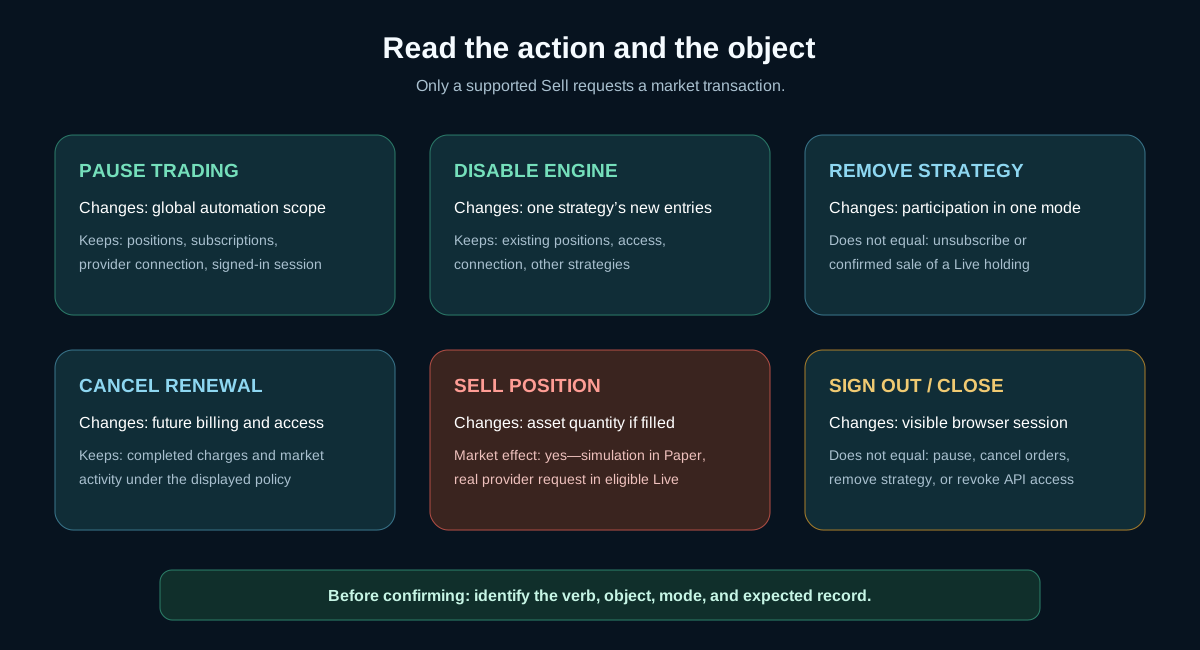
These verbs have different scopes and consequences. Read both the verb and the object named by a confirmation.
Only a supported sell requests a market transaction. Other actions change automation, participation, access, billing, presentation, or session state.
Action
What it changes
What it does not automatically do
Pause trading
Stops applicable automation at the displayed global scope
Sell positions, revoke credentials, cancel subscriptions, or sign out.
Disable decision engine
Prevents one strategy from opening new positions in one mode
Sell or remove existing positions.
Remove from Paper or Live
Ends strategy participation in that mode according to the confirmation
Cancel a subscription or guarantee a Live holding was sold.
Cancel renewal
Changes future billing and access timing under the displayed policy
Reverse charges or market activity, or close Live positions.
Sell
Sends or simulates a sell request for the confirmed position and mode
Disable a strategy, cancel access, or guarantee proceeds.
Realize portfolio cash
Requests supported sales across the stated portfolio scope
Guarantee every asset can sell immediately or at the estimate.
Remove connection
Removes TraderLobby’s saved provider relationship
Close positions, withdraw funds, or erase provider history.
Hide dust or collapse panel
Changes presentation
Change balances, holdings, slots, eligibility, or automation.
Switch workspace
Changes whether you view Paper or Live
Pause automation in the workspace you left.
Sign out or close browser
Ends or hides the current browser session
Pause server-side automation or cancel provider orders.
Provider and security terms
Term
Definition
Exchange or provider
Third party holding the account and assets, defining API access, and making final Live order decisions.
API connection
Saved relationship with a supported provider credential, currency, budget, validation, and default state.
API key or credential identifier
Public or identifying portion of provider access. It remains account-sensitive.
API secret or private key
Secret signing material used to authenticate requests. Never share it with people, Community, or support.
Read permission
Provider permission to retrieve allowed account, balance, holding, product, or order information.
Spot order permission
Provider permission for supported spot-market orders, limited to what TraderLobby requests.
Withdrawal or transfer permission
Authority to move assets out of the provider account. TraderLobby does not need it; never enable it for TraderLobby.
MFA
Multi-factor authentication, such as a password plus an authenticator code.
Passkey
Device-backed sign-in using a device PIN, biometric unlock, or security key without sharing biometric data with TraderLobby.
Session
A signed-in browser or device context. Revoking a session does not revoke an exchange credential.
Translate a question into the right page
If you are asking…
Terms to search
Best first page
Why did nothing buy?
Candidate, decision engine, used slot, tradable cash, order permission
Trading, then Transactions.
Why is the amount smaller than expected?
Allocation, PCR percentage, available cash, strategy cap, minimum
Strategy settings, then API Connections.
Did the exchange execute it?
Order, fill, status, partial fill, fee
Transactions, then the exchange.
Why do two returns differ?
Period, evidence source, realized P&L, mark-to-market, ROI
Reporting and strategy evidence.
Will removing this sell?
Disable, remove, cancel, sell, liquidate
The confirmation and action comparison above.
Why can I see balances but not trade?
Valid connection, order permission, default Live account, provider gate
API Connections.
Why did a position disappear?
Mode, search, dust, closed trade, position, fill
Trading and Transactions.
Does closing the app stop it?
Running, paused, enabled, workspace
Trading and the App tour.
What to read next
You now have the language needed for the workflow guides. The next planned guide explains Paper and Live in depth and uses these definitions consistently.