
Choose and configure a strategy
Use evidence, purpose, and controls—not a return number alone.
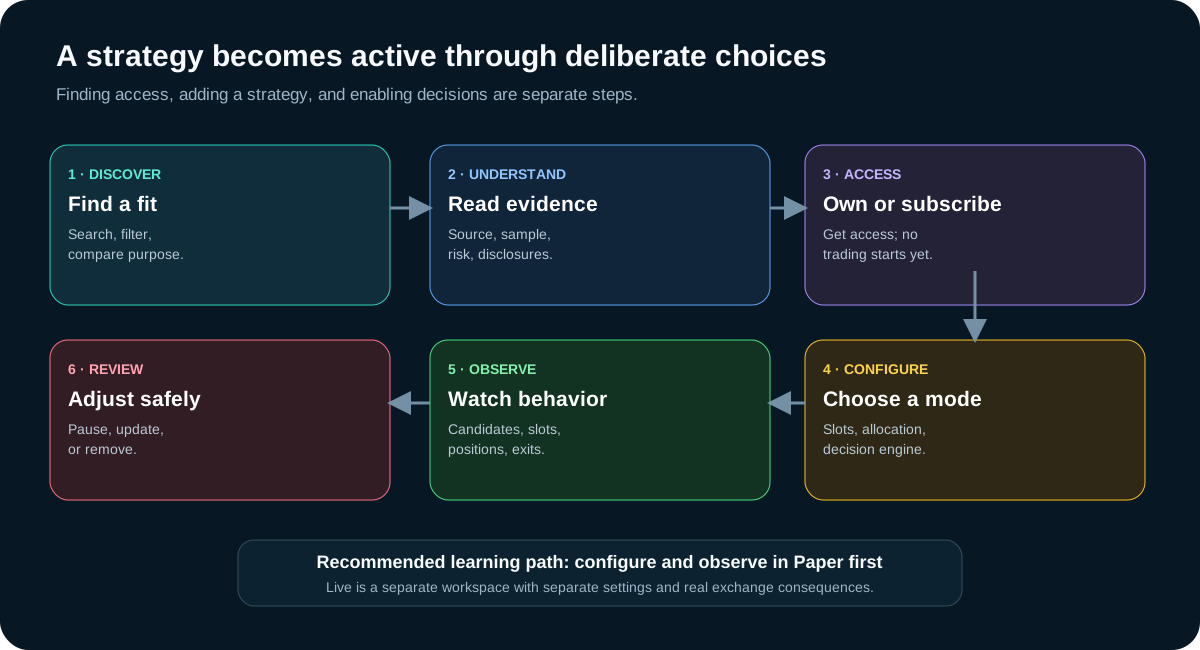
Choosing a strategy is not a one-click bet on a return number. It is a sequence of customer decisions: understand what the strategy is designed to do, judge its evidence in context, obtain access, add it to one workspace, set its boundaries, and observe how it behaves.
The strategy journey at a glance
Use the complete path below even when a card looks familiar. A strategy that fits another customer, market period, or account size may not fit your purpose or constraints.
What a strategy is—and is not
A TraderLobby strategy is a defined decision process that evaluates supported assets and can identify possible entries and exits. Its marketplace page describes its purpose, published evidence, recommended position slots, access terms, and customer controls without exposing its private decision logic.
| A strategy can | A strategy cannot promise |
|---|---|
| Evaluate eligible candidates according to its defined method | That a candidate will become an order |
| Request an entry when its conditions and your controls allow it | That the exchange will accept or fill the order |
| Manage app-attributed positions according to its exit rules | A profit, a particular win rate, or protection from loss |
| Compete with other enabled strategies for available capital | That historical, Paper, or other customers’ results will match yours |
The same strategy can produce different activity across accounts because cash, existing holdings, connection limits, slot availability, timing, fees, provider rules, and market conditions differ.
Find a strategy that fits your purpose
Open Strategies and begin with a question—not a percentage. What kind of behavior do you want to observe? How many simultaneous positions can you supervise? How much capital can you allocate without crowding your other strategies?
| Control or shelf | How to use it |
|---|---|
| Search | Look by strategy name, creator, or tag. Search narrows the catalog; it does not rank suitability for you. |
| All | Browse every strategy currently visible to your account. |
| My library | Return to strategies you own, subscribe to, created, or already configured. |
| TraderLobby Originals | View strategies published by TraderLobby. This label identifies the publisher, not a guarantee. |
| Community | View strategies published by eligible creators. Read the creator, evidence, terms, and disclosures carefully. |
| Proven with more history | A ranking that considers both results and meaningful sample size. It is evidence ordering, not a recommendation. |
| Most tested | Surfaces strategies with larger completed-trade evidence sets. Volume of testing does not remove risk. |
| Sort | Compare relevance, popularity, win rate, test volume, or price. Change the sort to challenge your first impression. |
Read a marketplace card before opening the details
The card is a summary, not the entire decision. Labels can include the strategy name, publisher, price or access state, short purpose, tags, evidence win rate, completed closes, ratings, and whether it is already selected in Paper or Live.
| Card signal | Question to ask |
|---|---|
| Name, description, and tags | Can I explain the intended behavior in plain language? |
| Original or Community publisher | Who maintains it, and which evidence sources are available? |
| Price, Subscribed, or Owned | Do I already have access? If not, what recurring or one-time terms are shown? |
| Win rate and closes | How many completed outcomes support the percentage, and from which environment? |
| Paper or Live state | Is this card only accessible, or is it already configured in a workspace? |
| Rating and reviews | Do comments describe specific product experience, or make unsupported performance claims? |
Read the strategy detail page
Open the detail page before subscribing or adding. Read from top to bottom rather than stopping at the first favorable metric.
- Purpose and publisherRead the summary, tags, publisher, publication date, and whether it is a TraderLobby Original or Community publication.
- Access and priceConfirm whether it is owned, included, subscribed, or requires checkout. The terms shown at checkout are authoritative.
- EvidenceCompare win rate with completed closes, historical return, Paper evidence, Live evidence, realized Live P&L, and the source displayed.
- Operating shapeReview recommended slots and any description of frequency, holding style, or intended behavior.
- Customer contextRead ratings, reviews, subscribers, disclosures, and available release notes.
- Mode controlConfirm whether you are adding or configuring the strategy in Paper or Live. Each workspace keeps separate settings.
Understand the evidence without turning it into a forecast
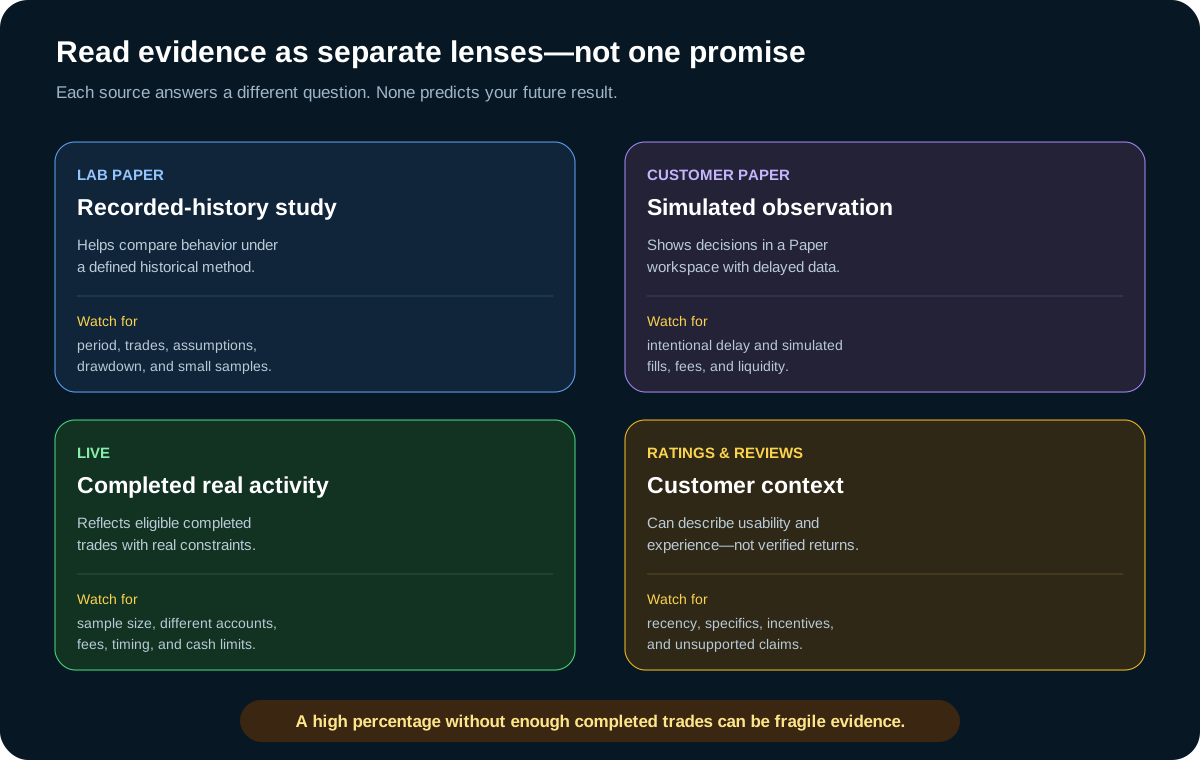
| Evidence label | What it can help you understand | Important limit |
|---|---|---|
| Lab Paper | How the strategy behaved in a defined recorded-history simulation | It depends on the period, method, assumptions, and available history. It is not a customer result. |
| Customer Paper | How decisions appeared in simulated customer workspaces | Market data and fills are intentionally simulated and may be delayed. |
| Live | Eligible completed real-money outcomes reported through the product | Accounts, timing, balances, providers, fees, and market conditions differ. |
| Ratings and reviews | How customers describe usability or experience | A review is not verified investment performance or personalized advice. |
TraderLobby’s evidence-aware ordering can reward both the observed rate and the amount of completed evidence. That is why a strategy with a slightly lower rate and a much larger sample can rank ahead of one with a perfect-looking but tiny sample. This cautions against fragile percentages; it does not prove that either strategy will perform well next.
Compare responsibly
A useful comparison balances purpose, evidence quality, operating demands, capital needs, and price. No single column answers all five.
| Comparison question | Why it matters |
|---|---|
| What behavior is it designed to find? | Two strategies can have similar results while responding to very different market conditions. |
| How much evidence exists, and where did it come from? | Sample size and environment determine how much weight a metric deserves. |
| How many slots does it recommend? | More slots can consume more cash and create more positions to monitor. |
| How will it share capital with my current strategies? | Strategies compete for currently eligible cash; displayed targets do not reserve future cash. |
| What does access cost and when does it renew? | A subscription decision is separate from the trading risk and capital decision. |
| Can I observe it long enough in Paper? | One quiet day or one favorable move is not a broad evaluation. |
Subscription, access, adding, and enabling are different
| Action | What changes | What does not happen automatically |
|---|---|---|
| Subscribe or own | Your account receives access under the displayed terms | The strategy is not allowed to make decisions in every workspace. |
| Add to Paper | A Paper configuration and card become available | It does not add the strategy to Live or connect an exchange. |
| Add to Live | A separate Live configuration becomes available when access and account gates allow it | It does not bypass connection, budget, permission, or readiness checks. |
| Enable decision engine | The strategy may open new positions in that selected workspace | It does not guarantee an order, fill, or result. |
If checkout is required, review the current price, billing interval, renewal language, cancellation policy, and strategy identity before confirming. Private strategies, expired previews, or plan-gated features may have additional access requirements displayed by the app.
Choose Paper or Live before configuring
Paper and Live preferences are stored separately. Changing Paper slots or allocation does not silently rewrite Live settings, and the reverse is also true. Read the mode label at the top of the strategy settings dialog every time.
| Paper strategy settings | Live strategy settings |
|---|---|
| Use simulated cash and positions | Use the connected exchange account and its real eligible cash |
| Help you learn controls with intentional Paper timing | Can lead to real orders and real financial consequences |
| Safe place to try slot and allocation combinations | Should begin with conservative boundaries you can afford and supervise |
| Do not prove future Live behavior | Require separate connection, permission, budget, and readiness gates |
Set position slots
Position slots are the maximum concurrent holdings that the strategy may occupy in the selected workspace. The allowed setting is 1 through 50, but the largest allowed number is rarely the best starting point.
- Start from the recommendation. Treat recommended slots as an operating reference, then reduce them if your cash or monitoring capacity is smaller.
- Read “Used” as capacity already occupied. A slot can remain used while an order or position is being reconciled, and very small holdings may be visually filtered.
- Slots are not promised trades. Empty slots only mean capacity exists; the strategy still needs an eligible candidate and every other check.
- Strategies share the account. Several enabled strategies can compete for the same available cash even when each has unused slots.
Choose a capital-allocation method
Capital allocation controls the target size for each new entry. The target is then constrained by strategy limits, available cash, your connection’s maximum usable cash, minimum order sizes, ownership, slot availability, current risk checks, and provider acceptance.
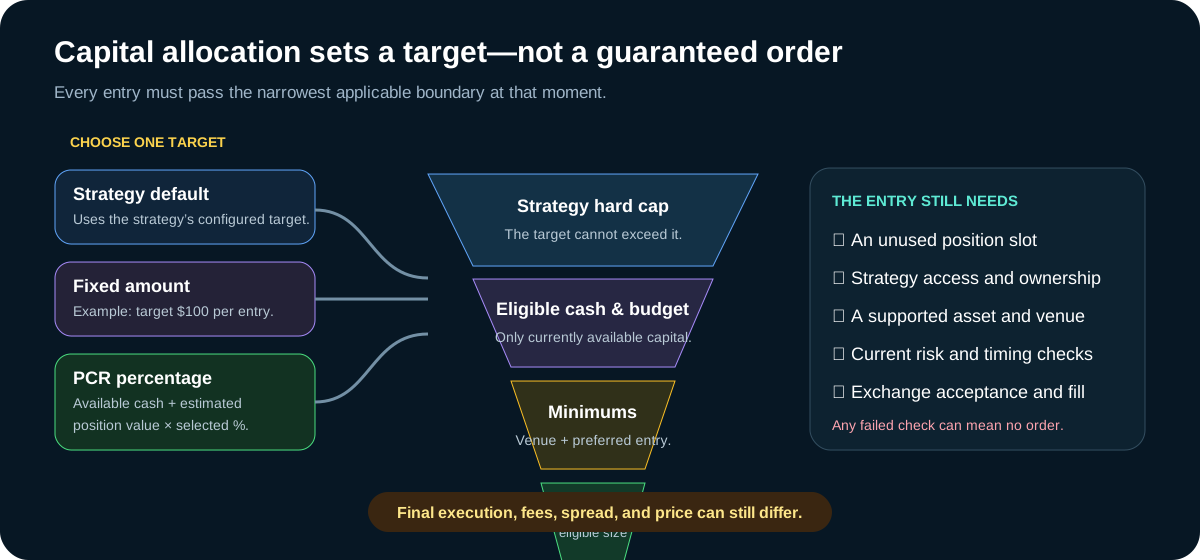
| Method | How the target is formed | When it may help |
|---|---|---|
| Strategy default | Uses the strategy’s configured entry target, still capped by every customer and exchange boundary | A simple starting point when you understand the strategy’s documented sizing. |
| Fixed amount | Requests the same selected dollar target for each new entry | Useful when you want a predictable per-entry ceiling. |
| PCR per entry (%) | Multiplies the selected percentage by Potential Cash Realize: currently available cash plus estimated position value | Useful when you want the target to grow or shrink with eligible portfolio context. |
PCR is not the same as cash. It includes estimated position value, so a PCR percentage can produce a target larger than current cash. The final eligible entry can still be reduced to what is actually available. Existing positions are not automatically sold to fund the target.
Worked sizing examples
These examples use fictional values and omit fees and price movement so the boundaries are easier to see.
| Situation | Target calculation | Eligible result before final provider checks |
|---|---|---|
| Default target $150; available cash $500; strategy cap $150 | $150 default, capped at $150 | $150 if slots and minimums pass |
| Fixed target $200; strategy cap $150; available cash $500 | $200 reduced by the $150 strategy cap | $150 if remaining checks pass |
| PCR $1,500; selected rate 10%; available cash $90 | $1,500 × 10% = $150 | $90 at most, if $90 satisfies the minimums |
| Preferred minimum $100; available cash $70; venue minimum $10 | $70 is below your preferred minimum | $0 unless “use remaining eligible cash” is enabled; then up to $70 may proceed because the venue minimum is met |
The preferred minimum is a customer preference, not a way to override an exchange minimum. If the provider requires a larger order, the entry cannot proceed.
Control new decisions with the decision engine
The decision engine toggle controls whether the strategy may open new positions in the selected workspace. Keep it disabled while reviewing settings or whenever you do not want new entries.
Save, then observe the whole decision path
- Confirm the modeRead Paper or Live in the settings dialog. Do not rely on what you selected earlier in the session.
- Review every fieldCheck decision engine state, slots, allocation method, amount or percentage, preferred minimum, and remaining-cash option.
- Save strategy settingsWait for the app’s success or error message. A closed dialog alone is not proof that the server accepted the change.
- Watch the strategy cardConfirm Enabled or Disabled, Used slots, and the correct workspace label.
- Follow candidates and activityA candidate can remain under evaluation without becoming an order. Use Trading and Transactions to verify later stages.
- Revisit after real observationsAdjust one boundary at a time so you can understand its effect.
Understand bundles and combinations
A recommended bundle is a named combination of member strategies studied under shared-capital rules. Members may look for different behavior, share cash, and take turns rather than acting as isolated accounts.
| Bundle detail | How to interpret it |
|---|---|
| Member list | The strategies included in the combination; confirm which ones you already access. |
| Historical period and result | A defined Lab Paper simulation for the combination, not a future forecast. |
| Closed trades, win rate, and drawdown | Evidence about the combined study; read the sample and downside together. |
| $1,000 simulated ending value | An illustration under the study’s assumptions, not an account projection. |
| Bundle checkout or subscription action | May obtain access only to missing member strategies under the terms shown. Configuration remains separate. |
Subscriptions, cancellation, and published updates
An active subscription controls continued access. Canceling normally changes future renewal under the displayed billing terms; it does not sell positions, remove a strategy from Paper or Live, or reverse completed market activity.
When a creator publishes an eligible update, review the release notes and version information presented to you. A newly published version should not be treated as identical to the version you previously evaluated. Revisit its purpose, evidence, and operating impact before accepting or enabling it.
| If your goal is… | Use… |
|---|---|
| Stop new strategy entries | Disable the decision engine in the correct workspace. |
| Remove the strategy configuration | Remove from Paper or Remove from Live after reading the confirmation. |
| Stop future subscription renewal | Manage or cancel the subscription in Billing. |
| Exit an existing holding | Use the applicable position exit flow; removing or canceling is not a sale. |
| Adopt a published strategy update | Read the release notes and explicitly accept the approved update when offered. |
Use ratings, reviews, and reports carefully
Ratings and reviews can describe clarity, usability, support, or customer experience. They are not verified performance evidence. Do not post balances, account identifiers, API credentials, or claims that cannot be supported.
Use Transactions to trace orders and fills, and Reporting to study results over a selected period. For Live activity, compare the product view with the connected exchange, which remains the final record for accepted orders, fills, assets, and provider fees.
Remove a strategy safely
| Action | Stops new decisions? | Closes holdings? | Cancels billing? |
|---|---|---|---|
| Disable decision engine | Yes, for that strategy and workspace | No | No |
| Remove from Paper or Live | Yes, by removing that workspace configuration | No—removing is not selling | No |
| Cancel subscription | May end future access according to its effective date | No | Stops future renewal according to displayed terms |
| Place a sell order | No; the strategy can remain enabled unless changed separately | Requests an exchange sale in Live or a simulated sale in Paper | No |
A careful first Paper run
- Choose one understandable strategyWrite down its purpose, evidence source, sample size, recommended slots, and why you selected it.
- Add it only to PaperConfirm the mode label and leave Live unchanged.
- Begin with few slotsOne or two slots make it easier to follow each candidate, entry, and exit.
- Use a clear allocation ruleChoose default, a modest fixed amount, or a PCR rate you can calculate by hand.
- Observe more than headline P&LWatch candidates, used slots, skipped entries, positions, exits, and Transactions.
- Review across different conditionsOne session is not enough to understand frequency, inactivity, or response to changing markets.
- Change one setting at a timeRecord what changed and why before comparing the next observation period.
Common questions
| Question | Answer |
|---|---|
| Why did no trade open after I enabled the strategy? | Enabled means the strategy may decide; it still needs an eligible candidate, slot, cash, access, risk approval, provider support, and—for Live—exchange acceptance. |
| Why was the entry smaller than my fixed or PCR target? | The target was narrowed by available cash, strategy cap, connection budget, minimums, or other current constraints. |
| Why does Used show a slot I cannot immediately see? | An in-progress or reconciled position can still occupy capacity, and a very small holding may be hidden by a display filter. Refresh and check Transactions. |
| Does subscribing start trading? | No. Subscription, workspace configuration, and decision-engine enablement are separate. |
| Does disabling close my positions? | No. It stops new decisions for that strategy in that workspace; it is not a sale. |
| Does removing cancel my subscription? | No. Manage renewal separately in Billing. |
You are ready to continue when…
- You can describe the strategy’s purpose without quoting its return.
- You know which evidence source and completed-trade count support the displayed percentage.
- You understand that subscribing, adding, enabling, disabling, removing, canceling, and selling are different actions.
- You can calculate your chosen allocation target and name the boundaries that may reduce it.
- You have selected a small, understandable Paper configuration and know where to verify its activity.
- You know that Live requires separate settings and readiness checks.